Support / Bills of materials
Building a BOM
Adding components to an assembly, by hand or from CAD.
Bills of materials
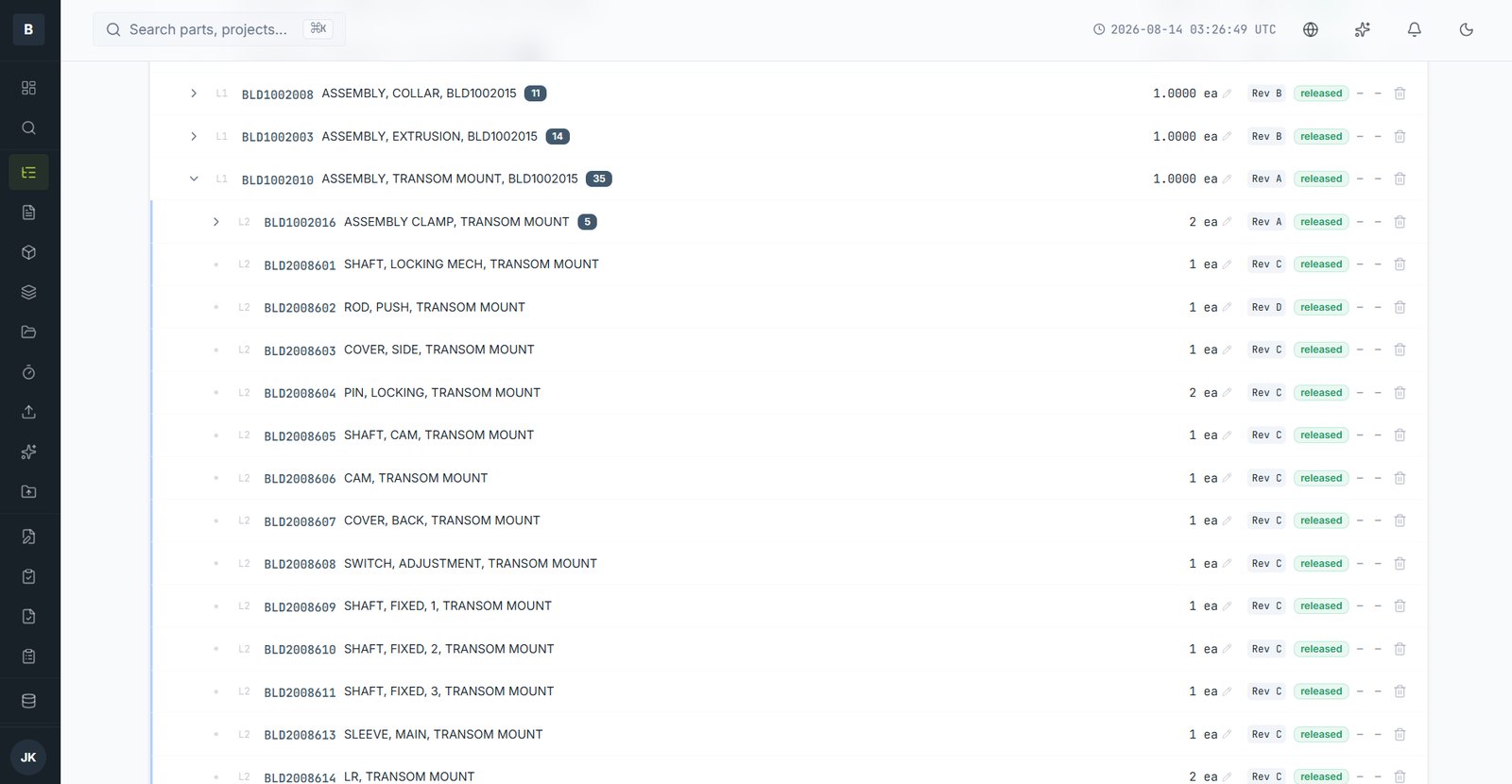
A BOM lists what an assembly is made of. Octagon BOMs are multi-level: a component can itself be an assembly, nested as deep as your product goes.
Adding components by hand
- Open the assembly and go to its BOM tab.
- Choose Add Item and search for the part by number or description.
- Set the quantity and unit of measure.
- Add a reference designator if it matters — essential for electronics.
From a CAD assembly
With the add-in, sync the open assembly and its structure becomes the BOM directly — components, quantities and nesting. Anything not yet in the vault is flagged so you can register it first. This is much faster and much less error-prone than typing.
Virtual and phantom items
- Virtual parts — things consumed but not stocked as discrete items: adhesive, thread lock, packaging consumables.
- Phantom assemblies — a grouping that exists for engineering clarity but is not built as a sub-assembly. It flattens into its parent for manufacturing.
Circular references
You can't add an assembly to its own BOM, directly or several levels down. The attempt is refused with an explanation of the loop.
Still stuck?
Email [email protected] and a person will pick it up. Include the part number and what you were doing — it saves a round trip.