Support / Getting started
Notifications
Choosing what you're told about and where you're told.
Getting started
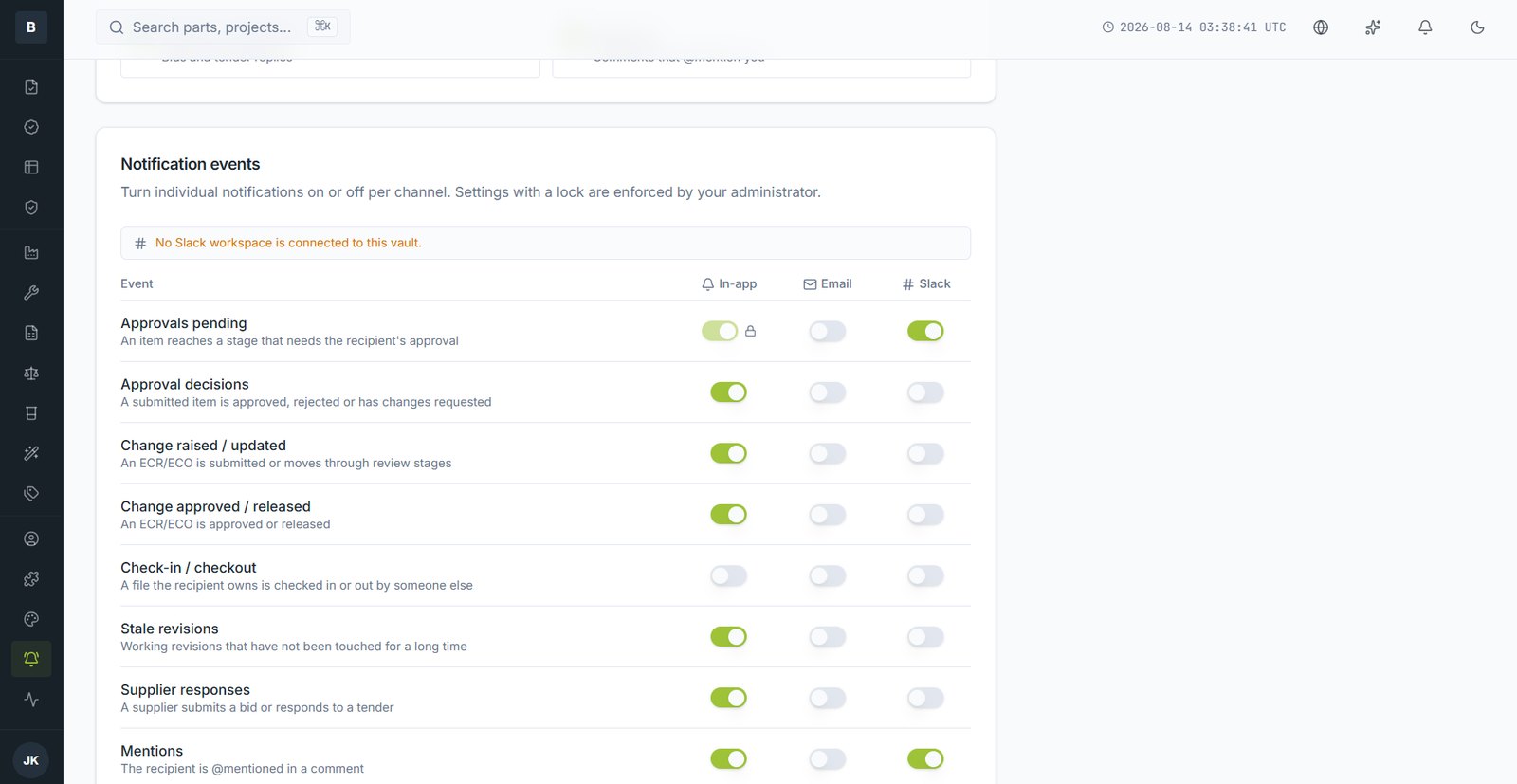
Octagon notifies you when something needs your attention or when something you're involved with changes. You control both what and where.
Where notifications can go
- In-app — the bell in the top bar
- Email — to your work address
- Slack — if your company has connected a workspace
Setting your preferences
- Open Notifications from the System group in the sidebar.
- Each event type has a switch per channel.
- Changes save as you make them.
The events you can control
| Event | Fires when |
|---|---|
| Approvals pending | Something reaches a stage that needs your approval |
| Approval decisions | Something you submitted is approved, rejected, or sent back |
| Change raised / updated | An ECR or ECO is submitted or moves stage |
| Change approved / released | A change completes and takes effect |
| Check-in / check-out | A file you own is locked or released by someone else |
| Stale revisions | A working revision of yours hasn't been touched in a long time |
| Supplier responses | A supplier submits a bid or replies to a tender |
| Mentions | Someone @mentions you in a comment |
Locked settings
A switch with a padlock has been enforced by your administrator and can't be turned off — usually approvals, so nothing sits unnoticed.
Still stuck?
Email [email protected] and a person will pick it up. Include the part number and what you were doing — it saves a round trip.