Support / Supply chain
Approved vendors
Maintaining the vendor list and linking suppliers to parts.
Supply chain
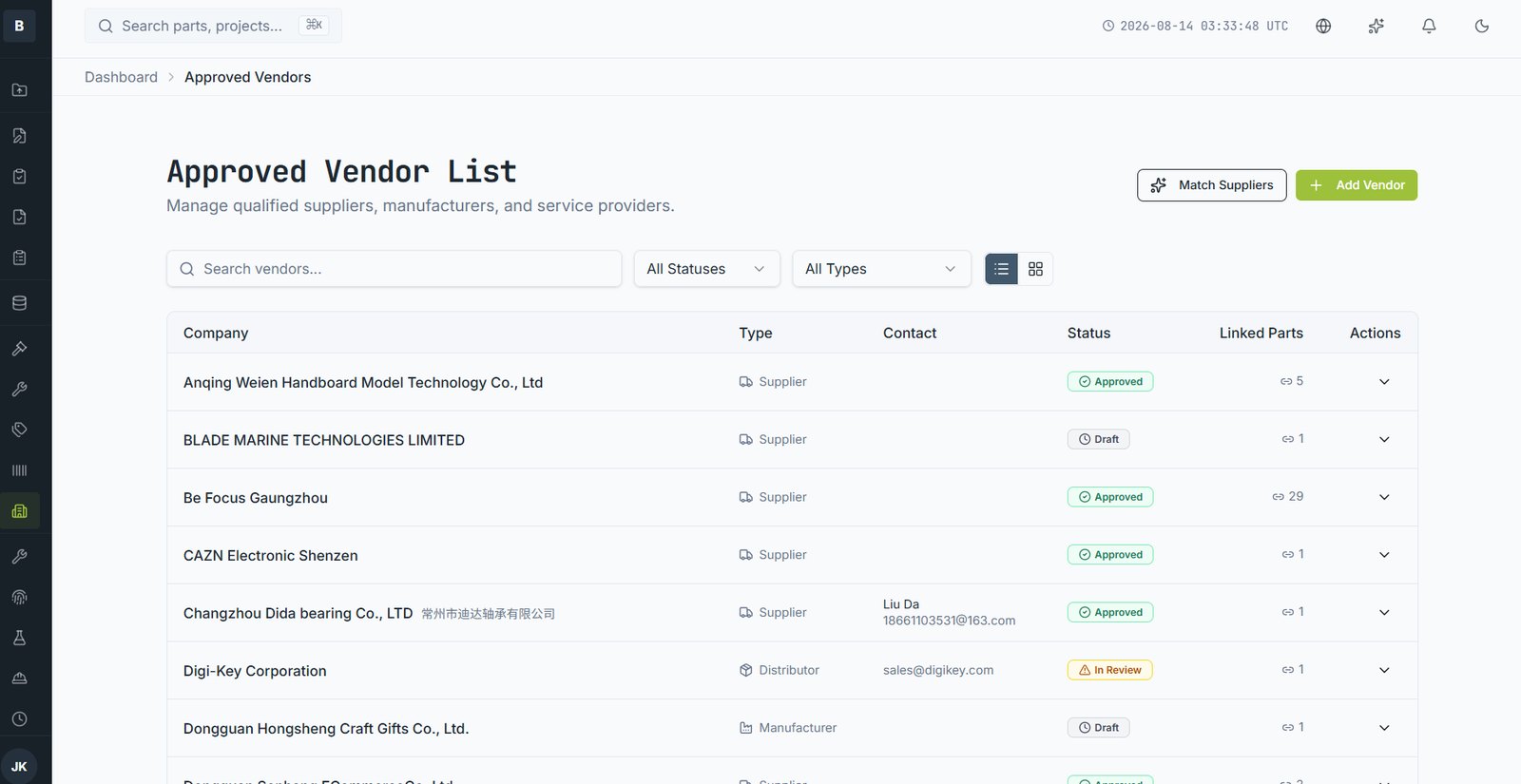
The Approved Vendor List holds every supplier, manufacturer, distributor and service provider you work with, and links them to the parts they supply.
Adding a vendor
- Open Approved Vendors and choose Add Vendor.
- Enter the company name, type and contact details.
- Set the status: Approved, In Review or Draft.
- Add qualification evidence — certifications, audit reports, agreements.
Linking to parts
From a part's Supply Chain tab, add a supplier and record their part number, price, MOQ, lead time and currency. Several suppliers can be linked to one part; mark one as primary and its price drives cost rollups.
Status and what it controls
| Status | Meaning |
|---|---|
| Approved | Qualified. Can be used for production purchasing. |
| In Review | Under qualification. Usable for quoting, not normally production. |
| Draft | Recorded but not yet assessed. |
Supply chain
Linked parts count
Each vendor shows how many parts depend on them. Sorting by that number is a fast way to see where your supply risk is concentrated.
Still stuck?
Email [email protected] and a person will pick it up. Include the part number and what you were doing — it saves a round trip.